Browser Game Input Check (keyboard that just works)
/browser-game-input-check
A GameSkill original for keyboard input in browser games: a drop-in input.js that binds physical keys, ignores OS repeats, stops page scrolling, releases keys on alt-tab, never loses quick taps, ignores text fields and leaves browser shortcuts alone, plus a checker that drives the game in headless Chrome and prints PASS / FAIL with a fix for 15 checks, including one press acting once through a slow frame.
- License
- MIT
- By
- By GameSkill
Tested by GameSkill
30/30 checks passed on Headless Chrome (DevTools protocol) + Node 22 (2026-11-09): trigger, a runnable example, a screenshot and self-check, one job per skill, and English + Chinese docs. Trigger checks match prompts against skill descriptions; they are not a live agent run.
Test reportGameSkill's tested copy
Written and tested by GameSkill for gameskill.dev. The ZIP holds the whole skill: SKILL.md and its Chinese version, scripts, a runnable example, tests, the self-check list and our test report.
A GameSkill original, released under MIT. The ZIP keeps LICENSE and CREDITS.md, which lists the workflow inspiration, the CC0 test assets and the third-party libraries with their licenses.
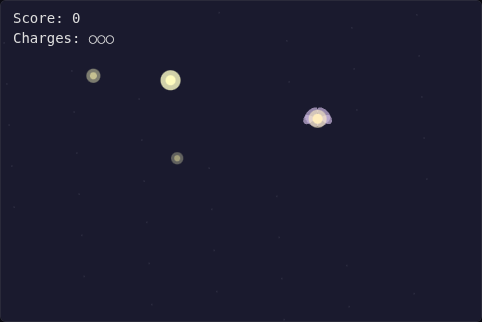
Self-check
- 按 event.code 绑定,不用 event.key / Bind by event.code, not event.key
- 每个固定步长调用一次 input.update() / input.update() once per fixed step
- input_check.mjs 带 --count 输出 15/15 passed / input_check.mjs with --count prints 15/15 passed
- 页面比窗口高时方向键和空格不滚动 / Arrows and Space do not scroll a tall page
Install
Tell your AI
Install the skill from https://gameskill.dev/skills/browser-game-input-check/install.md
GameSkill's tested copy
mkdir -p .claude/skills
curl -fsSL https://gameskill.dev/dl/skills/browser-game-input-check.zip -o /tmp/gameskill-browser-game-input-check.zip
unzip -oq /tmp/gameskill-browser-game-input-check.zip -d .claude/skills
rm /tmp/gameskill-browser-game-input-check.zip
What you get
- input.js: held / pressed / released / axis by event.code, edge queue, repeat filter, blur reset, text-field and shortcut safety, debug() probe
- tools/input_check.mjs: 15 checks in headless Chrome over the DevTools protocol, each FAIL with a fix; --count reads a real game action
- Lantern Moth, our own small canvas game, and a broken copy with the usual naive input that fails 8 checks
- 18 checks in test/run_tests.mjs, run on Node 22 and Chrome headless
Good fit
- Any HTML5, canvas or WebGL game with keyboard controls, before release or after an agent wrote the input code
- Keys that stick after alt-tab, pages that scroll with the arrows, WASD that fails on AZERTY
- A jump or shot that fires twice when a frame is slow
Not for
- Gamepad, touch or key remapping UI
- Native engines (Godot, Unity): their input systems handle this differently
Try this prompt
My canvas platformer scrolls the page when I press Space, keys stick after alt-tab and sometimes the jump fires twice. Fix the keyboard input and prove it.About this skill
A GameSkill original. Keyboard code in browser games breaks in the same eight ways: WASD on AZERTY, repeat re-presses, page scrolling, stuck keys after alt-tab, two keys on one action, lost quick taps, typing in a text field, and one press firing several times when a fixed-timestep game has a slow frame. input.js avoids all of them, and tools/input_check.mjs proves it: it starts headless Chrome, sends real key events over the DevTools protocol and prints PASS / FAIL with a fix for 15 checks. Point --count at a real game action and it checks the game, not just the input module.
Agent steps
- Drop in
input.js, bind actions byevent.code, and callinput.update()once per fixed step. - Run
input_check.mjson the game with--countpointed at a game action. - Fix each FAIL from its fix line and run again until it prints 15/15.
Common bugs it catches
event.keybindings, OS key repeat re-firing, and arrows or Space scrolling the page.- Keys stuck after alt-tab, quick taps lost between frames, and the game reacting to typing.
- One press acting two or three times through a slow frame because input is updated per display frame.
Credits
The code, the Lantern Moth example and the text are ours.
Requirements
- Node 22+ (built-in WebSocket); no npm packages
- Google Chrome or Chromium, run headless (set CHROME if it is not on PATH)
Topics
FAQ
Gacha Kit
Single and ten-pull animations: SSR cards charge up and burst in gold, then fly to the centre as holo cards that tilt with the mouse or phone gyro. Rarity timelines, skip, and Chinese and English text built in.
Works well with
Skills the author points to as related or as the better fit for neighbouring tasks.
De-AI Game UI (remove the generic AI look from menus and HUDs, checked by a lint)
A GameSkill original that strips the tells of AI-made game UI (purple-blue gradients, glass panels, neon glows, emoji icons, one big radius, everything centred, identical buttons, epic-journey copy) and rebuilds the screen from the game's own world. Ships a 12-rule lint that reads computed styles in headless Chrome for any framework, a before/after pause menu and a mutation test proving every rule can fail.
Web Audio SFX Synth (no audio files)
A GameSkill original: 12 game sound effects made from code with the Web Audio API, plus the mixer around them: unlock on the first tap, a compressed master bus with mute, pitch and level variation, stereo pan, distance falloff and a voice limiter. Every sound is rendered offline and checked for clipping.
Game Trailer from Code (Steam trailer and store images)
A GameSkill original: turn your own running game into a 15-second Steam gameplay trailer and every store image with code. Frame-exact capture, a JSON cut list, zh/en captions and SRT, a soundtrack synced to game events, an H.264/AAC encode, and a checker for Steam's trailer rules, loudness, the 6-second microtrailer and the capsule sizes. Version 1.1 adds a rhythm tool that finds every cut, dead air and black frames, matches cuts to the cut list and moves them onto the music's beat, plus stage-by-stage confirmation with the user.
Similar skills
Awesome Gamedev Agent Skills
77 portable SKILL.md skills across 12 engines (Godot, Unity, Unreal, Phaser, PixiJS, three.js, Bevy, pygame, LÖVE, Roblox, Defold, Ebitengine), with a router.
Three.js Game Skills
Nine Agent Skills for Codex and Claude Code that build playable Three.js browser games, with a director skill, a Vite scaffold and Playwright QA.
reanimate: clone an animation and prove it moves the same
Rebuild a UI animation from a live page, a screen recording, a gif or a Lottie file in your own code, then record the copy the same way and compare the two frame by frame, fixing timing, easing and stagger until the numbers match. Covers CSS, Web Animations, canvas, WebGL and three.js.
Hand Gestures (webcam hand controls for browser games)
Build webcam hand games and gesture controls for web pages with hand-gesture-kit on MediaPipe: 17 poses (fist, point, thumbs up, pinch…), motions (swipes, circles, taps, throws), two-hand clap and zoom, a mouse fallback, and synthetic hands so games are tested without a camera. Ships a complete three.js starter game with a ?bot=1 player, tests and capture tools, plus Google's hand model, so nothing downloads at setup.