reanimate: clone an animation and prove it moves the same
/reanimate
Rebuild a UI animation from a live page, a screen recording, a gif or a Lottie file in your own code, then record the copy the same way and compare the two frame by frame, fixing timing, easing and stagger until the numbers match. Covers CSS, Web Animations, canvas, WebGL and three.js.
- 许可证
- MIT
- 出品
- GameSkill 出品
我们测过
在 reanimate scripts on Bun with Playwright Chromium (headless shell, SwiftShader) 上通过 27/27 项检查(2026-11-03):能触发、有可运行示例、有截图和自检清单、单一职责、中英文文档齐全。触发检查是把提示词和 skill 描述做匹配,不是真实 agent 运行。
测试报告这个 skill 做什么
什么时候触发
Clone a section, widget, page or animation from any reference (a live website URL, a screen recording, an mp4/mov/webm, a gif, a Lottie file, a prototype export) frame by frame into the user's own codebase …
GameSkill 测过的版本
GameSkill 调优版:skill 文件取自提交 3f7a55a2986a,按我们的 skill 流程加上可运行示例、测试报告、自检清单和中文指南。
协议:基于 NiazMorshed2007/reanimate(作者 NiazMorshed2007),协议 MIT。ZIP 保留协议文件(LICENSE),CHANGES.md 列出了 GameSkill 加的所有文件。
自检清单
- 第一条消息写明保真等级:动作一致、像素一致或混合 / State the fidelity level first: motion-faithful, pixel-faithful or mixed
- 参考和复刻用完全相同的视口、裁剪、触发、时长和帧率录制 / Capture reference and clone with the same viewport, crop, trigger, duration and fps
- 先读 inspect.json 里声明的时长和缓动,再从像素估 / Use the declared timings in inspect.json before estimating from pixels
- 每一轮都看 compare 图,不只看数字 / Look at the compare sheets every round, not only the numbers
- canvas 和 WebGL 用 --clock virtual 和同一个 --seed / Canvas and WebGL: --clock virtual and the same --seed on both sides
- 5 轮还不过就报告差距和原因,不降低阈值 / After 5 rounds, report what still fails; never lower the threshold
推荐搭配
中文指南
这个 skill 做什么
把一个参考动画(网页、录屏、mp4/webm、gif、Lottie)在你自己的代码里重做出来,然后用同样的方式录下复刻版,逐帧和参考对比:时长、缓动、错开、顺序、布局,一轮轮修到数字对上。支持 CSS、Web Animations、canvas、WebGL 和 three.js。默认只对齐「动起来的方式」,文字、颜色、字体、图片用你自己的。
什么时候用
- 想让游戏的标题画面、菜单、HUD 转场和某个参考视频或 gif 动得一样
- 想证明重做的动画时长和缓动一致,而不是「看起来差不多」
- 粒子、canvas、WebGL 动效要做到两次录制可以比较
怎么装
下载本页 ZIP,把 reanimate/ 放进 agent 的 skills 文件夹:Claude Code 用 .claude/skills/,Codex、Gemini CLI、OpenCode 用 .agents/skills/,Cursor 用 .cursor/skills/,Copilot 用 .github/skills/,Windsurf 用 .windsurf/skills/。然后运行一次 bash reanimate/scripts/setup.sh。需要 Bun 1.1+,首次会下载 Playwright 的 Chromium 和静态 ffmpeg(约 250 MB),不需要 API key。也可以直接对 agent 说:Install the skill from https://gameskill.dev/skills/reanimate/install.md
最小示例
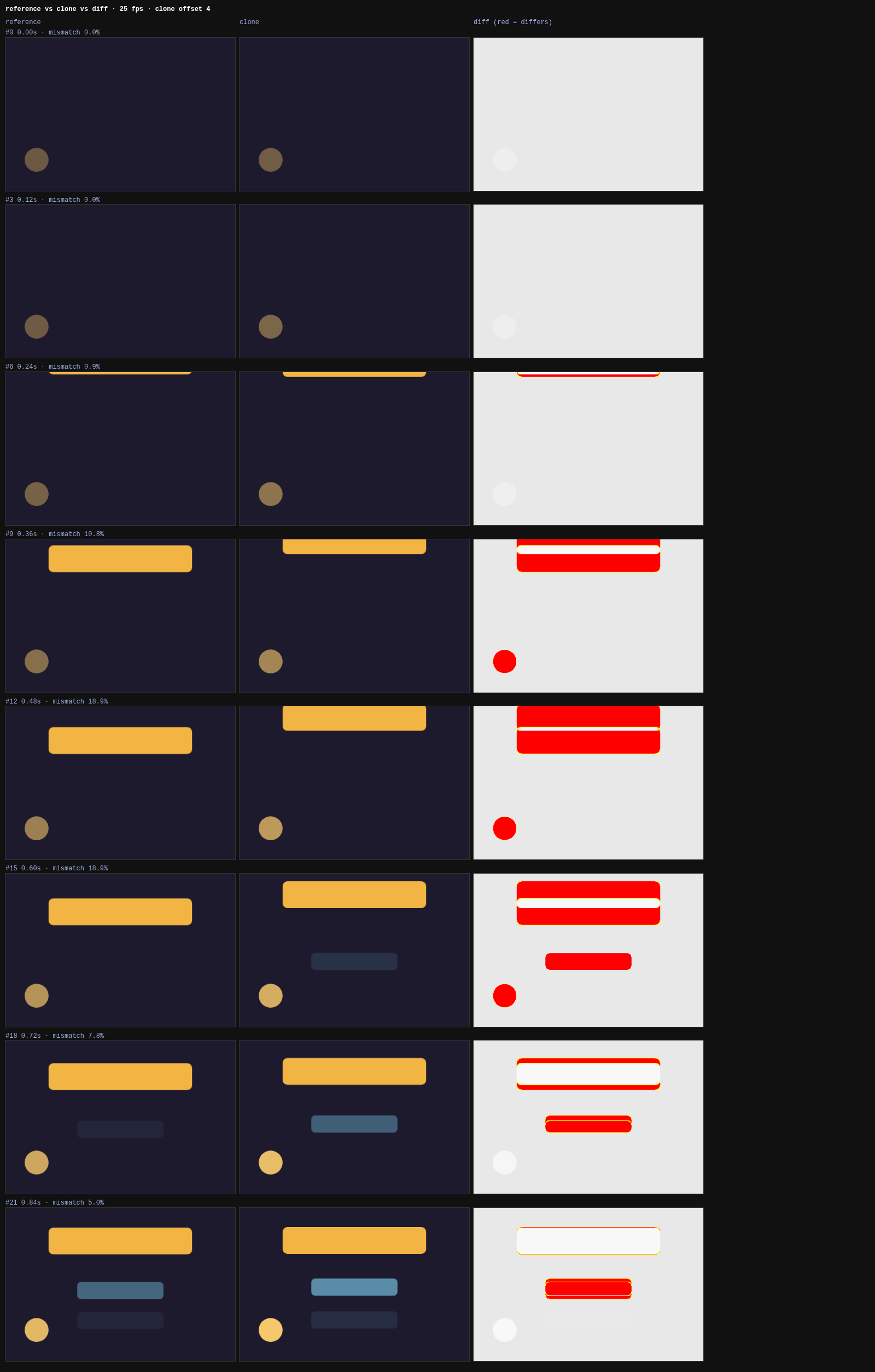
gameskill/examples/lantern-menu/ 是我们为测试做的原创标题画面「灯笼菜单」:标题带回弹落下,三个按钮依次淡入上移,左下角一盏灯在呼吸。ref.html 用 CSS 关键帧做参考,clone.html 用 Web Animations API 按动作规格重做;加 ?bad=1 是一个错误的第一版(线性缓动、按钮错开太慢),用来确认对比工具能抓到问题。
我们怎么测的
总分 27/27,结果在 gameskill/test-report.json。全部用 skill 自带的脚本:capture.ts 在虚拟时钟下录参考,inspect.json 读出标题的精确时长 700 ms、延迟 200 ms 和缓动 cubic-bezier(0.34, 1.56, 0.64, 1),以及按钮错开 700/820/940 ms;easing.ts 只看像素轨迹就认出 easeOutBack 和约 10% 回弹;正确的复刻 compare.ts 通过(像素差 0、时间误差 0);错误的第一版两项都不通过,easing.ts 指出它是线性缓动;sheet.ts 生成对比图;frames.ts 能读视频并裁剪抽帧;canvas 随机粒子用同一个 --seed 两次录制随机数一致、对比通过。WebGL 追踪(--gl)没有测。注意:两次虚拟时钟录制的动画帧时间戳相差约 0.5 ms,个别抗锯齿像素会不同,以 compare 结果为准,不要求逐字节相同。
版权提醒
这个 skill 复刻的是动作。参考里的文字、图片、字体和品牌属于原作者;只拿你有权改编的参考来用,美术用你自己的。
安装
告诉你的 AI
Install the skill from https://gameskill.dev/skills/reanimate/install.md
GameSkill 测过的版本
mkdir -p .claude/skills
curl -fsSL https://gameskill.dev/dl/skills/reanimate.zip -o /tmp/gameskill-reanimate.zip
unzip -oq /tmp/gameskill-reanimate.zip -d .claude/skills
rm /tmp/gameskill-reanimate.zip
包含内容
- A capture script: video, frames, every declared CSS and Web Animations timing, and per-frame element tracks
- easing.ts: names the easing curve, delay, duration and overshoot from tracked motion
- compare.ts and sheet.ts: frame-by-frame mismatch, timing error and side-by-side diff sheets
- A virtual clock and seeded Math.random for canvas, WebGL and particle motion
- A fidelity contract (motion-faithful, pixel-faithful, mixed) and a fix-and-recapture loop of 2 to 5 rounds
适合
- Matching a menu, HUD or title-screen animation to a reference video or gif
- Proving a rebuilt transition has the same timing and easing, not just a similar look
不适合
- Copying another studio's art, fonts or brand: by default it matches motion and leaves the look to you
- Engine-side animation in Godot, Unity or Unreal: it records browser pages and videos
试试这条提示词
Rebuild the title-screen entrance from this recording in my web game's menu: same drop, same button stagger, our own colours, and show me the compare report.关于这个 Skill
Rebuild what you point at so that it moves the way the reference moves, prove it with a frame-by-frame comparison, and keep going until the comparison passes. Works from a live website, a screen recording, an mp4/mov/webm, a gif, a Lottie file or a prototype export, and covers CSS and JS motion as well as canvas, WebGL, WebGPU and three.js scenes.
From the reanimate SKILL.md in NiazMorshed2007/reanimate.
What's inside
- A fidelity contract: motion-faithful (default), pixel-faithful or mixed
- Workflow: scope, setup, capture the reference, write the motion spec, build, verify, report
- Scripts:
capture.ts,frames.ts,easing.ts,compare.ts,sheet.ts,gl.ts - References for capture recipes, motion-spec analysis, implementation, verification and WebGL
Notes
- Motion, not assets: by default it matches timing and easing and leaves copy, colours, fonts and images to you. Use references you have the right to adapt.
- In our test, two virtual-clock captures of the same random-particle canvas used the same seeded numbers, but their animation-frame timestamps started about 0.5 ms apart, so a few anti-aliased pixels differed.
compare.tsstill passed them (mean mismatch 0.01%). Judge by the comparison, not by byte-identical frames.
环境要求
- Bun 1.1 or newer, macOS or Linux
- About 250 MB on first setup (Playwright Chromium and a static ffmpeg); no API keys
常见问题
基于 NiazMorshed2007/reanimate (作者 NiazMorshed2007,协议 MIT)。ZIP 里保留原作者的 LICENSE 和 NOTICE,ATTRIBUTION.md 和 CHANGES.md 写明来源提交和 GameSkill 加的内容。
搭配使用
作者标注的相关 Skills,或更适合相邻任务的 Skills。
De-AI Game UI (remove the generic AI look from menus and HUDs, checked by a lint)
A GameSkill original that strips the tells of AI-made game UI (purple-blue gradients, glass panels, neon glows, emoji icons, one big radius, everything centred, identical buttons, epic-journey copy) and rebuilds the screen from the game's own world. Ships a 12-rule lint that reads computed styles in headless Chrome for any framework, a before/after pause menu and a mutation test proving every rule can fail.
Game Feel & Juice
Add juice to actions: screen shake, hit-stop, eased motion, squash and stretch, knockback and layered audio-visual feedback.
Game UI/UX
HUDs and menus that work on every screen: anchored layouts, resolution and safe-area scaling, gamepad focus and event-driven updates.
相似 skills
Awesome Gamedev Agent Skills
77 portable SKILL.md skills across 12 engines (Godot, Unity, Unreal, Phaser, PixiJS, three.js, Bevy, pygame, LÖVE, Roblox, Defold, Ebitengine), with a router.
Three.js Game Skills
Nine Agent Skills for Codex and Claude Code that build playable Three.js browser games, with a director skill, a Vite scaffold and Playwright QA.
FunPlay Skill
14 MIT agent skills for game development with scripts and tests: sprite-sheet slicing, normal maps, audio conversion, game concept briefs, browser game slices, Unity MCP workflow and Cocos/WeChat minigame rules.
Godogen
Autonomous game development with Claude Code and Codex. Publishes a ready game repo for Godot, Bevy, Babylon.js or three.js.