Video to Game
/video-to-game
Treat a short gameplay video as the design document: study its frames, palette and cuts, build one playable Three.js game around its one mechanic, then prove it with side-by-side frames and a recorded keyboard playtest. GameSkill tested the whole loop with code-made assets; the author's fal asset step is optional and paid.
- 许可证
- MIT
- 出品
- GameSkill 出品
我们测过
在 video-to-game scripts (Python 3, ffmpeg, Node 22) + three.js r160 in headless Chrome 上通过 42/42 项检查(2026-11-03):能触发、有可运行示例、有截图和自检清单、单一职责、中英文文档齐全。触发检查是把提示词和 skill 描述做匹配,不是真实 agent 运行。
测试报告这个 skill 做什么
什么时候触发
js whose every image, 3D model, sound and music track is generated with fal, then proves it: side-by-side frames of the video and the game, and a scenario that plays the game with the keyboard and films its best seconds. …
GameSkill 测过的版本
GameSkill 调优版:skill 文件取自提交 d1a24fd8a475,按我们的 skill 流程加上可运行示例、测试报告、自检清单和中文指南。
协议:基于 lovisdotio/video-to-game(作者 lovisdotio),协议 MIT。ZIP 保留协议文件(LICENSE),CHANGES.md 列出了 GameSkill 加的所有文件。
自检清单
- 视频必须是原创概念和原创玩法,不出现现有游戏的角色、标志、名字或关卡 / The clip is an original concept: no characters, logos, names or levels from existing games
- 先跑 study_video.py,写完规格(机位、主角、一个核心机制、调色板、光照)再写代码 / Run study_video.py and write the spec before any code
- 游戏有完整循环:操作、目标、反馈、结束、重开,并暴露 window.__game / A full loop (controls, goal, feedback, end, restart) and window.__game
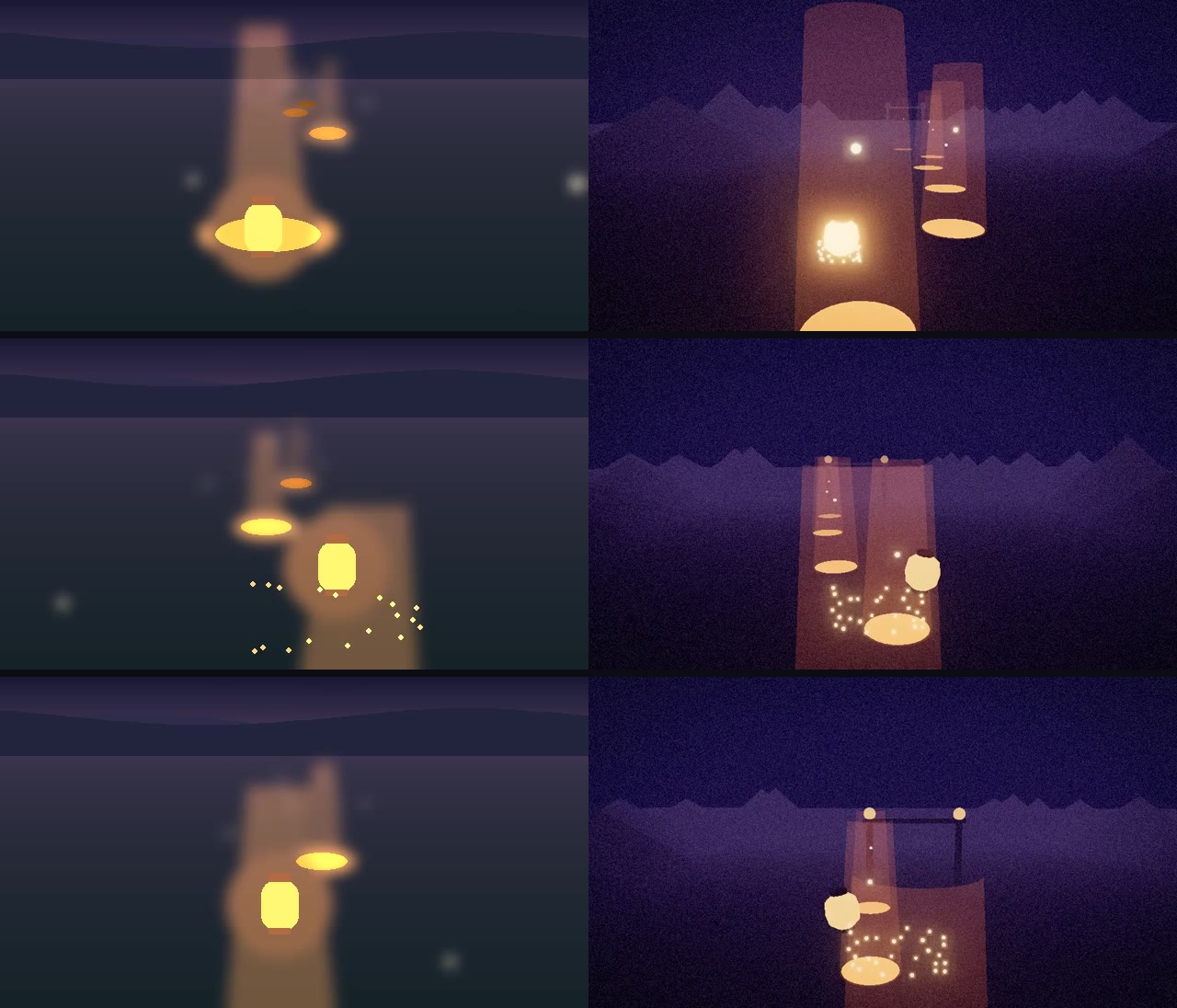
- 每次改画面都在同样三个时间点出 side_by_side 对比图 / Every look change is checked on side-by-side pairs at the same three times
- 录一段键盘试玩:0 个控制台错误、不掉出地图、没有空白秒 / A recorded keyboard take: zero console errors, no fall, no dead second
- 如实列出和视频不一样的地方;用了 fal 就列出每次调用和费用 / List honestly what differs from the video; list every fal call and its cost if fal was used
中文指南
这个 skill 做什么
把一段十几秒的游戏实机视频(视频模型生成的或你自己做的)当作设计文档:先逐帧研究它的画面、调色板、镜头和那一个核心玩法,再用 Three.js 做成一个能玩的网页游戏,最后用「视频和游戏同一时刻的对比图」和「脚本键盘试玩录像」来证明做到了。作者原本让所有素材都用 fal 生成(付费);GameSkill 加了一行说明:没有 FAL_KEY 时用代码做素材,并如实告诉用户。
什么时候用
- 有一段 AI 生成的游戏概念视频,想把它变成能玩的网页游戏
- 想用「对比图」而不是形容词来检查游戏画面像不像目标
- 想让 agent 自己用键盘试玩、录像,找出卡住、掉落、没事干的几秒
怎么装
下载本页的 ZIP,把 video-to-game/ 整个文件夹放进 agent 的 skills 文件夹:Claude Code 用 .claude/skills/,Codex、Gemini CLI、OpenCode 用 .agents/skills/,Cursor 用 .cursor/skills/,Copilot 用 .github/skills/,Windsurf 用 .windsurf/skills/,然后重启 agent。需要 Python 3.9+、ffmpeg,录像要 Node 18+ 和 Chromium 内核浏览器。也可以直接对 agent 说:Install the skill from https://gameskill.dev/skills/video-to-game/install.md
最小示例
gameskill/examples/ 是我们自己的原创概念「灯笼滑翔」:一个纸灯笼沿着夜晚的山谷往前飘,一直在慢慢下沉,只有飘到发光的暖气口上方才会被热气托起来;用左右键在气口之间转向,顺路收集挂在热气里的光点,最后穿过尽头的灯笼门。我们先用代码渲染了一段 12 秒的概念视频(代替视频模型,没有用任何现有游戏),再按 skill 的流程走:study_video.py 出帧、拼图和调色板,游戏的调色板直接取自测出来的颜色;用 templates/game.html 搭游戏(three.js r160 从 npm 装到本地 vendor/,素材全部由代码生成);play.mjs 按 window.__game 的状态用键盘转向;record_play.mjs 录 14 秒试玩,best_window.py 找出最热闹的 4 秒,side_by_side.py 在 2、6.3、9 秒出三组对比图。game/README.md 照 skill 第 7 步写了玩法、操作、素材来源(fal 调用 0 次)和与视频不同的地方。
我们怎么测的
全部用 skill 自带的脚本跑:视频研究出 48 帧、拼图、调色板,没有误判镜头切换;游戏的天空、雾、地面和山的颜色都和测出来的调色板一致,暖光保持视频里的橙色。游戏页面:没有 ?autostart 时停在标题页,屏幕上只有标题和一行操作说明;window.__game 按约定提供状态;同一个种子开两次山谷一样,换种子就不一样;加载时 0 个控制台错误。试玩录像:13.8 秒,0 个控制台错误,测试机上无界面 Chrome 约 60 fps;灯笼穿过了终点门,最低也在 3 米以上(没有掉下来),8 个气口全接住,收集到光点,每个采样都在移动(没有空白秒)。三组对比图都生成,并逐组量了亮度和暖光占比。fal 那一步要付费账号,我们没有测,也不默认使用。结果在 gameskill/test-report.json。
我们为 GameSkill 版在 SKILL.md 里加了两句说明,都写在 CHANGES.md:没有 FAL_KEY 时用代码做素材并如实说明;提示词文件在 upstream-support/prompts/ 里。
关于复刻
skill 自己的规则就要求「只做原创世界」。不要写「复刻某某游戏」,写「做一个某类型的游戏」加一个核心动作,比如「一个在灯柱之间滑翔的游戏」。
案例:视频转连招
有人分享过「用视频模型生成招式短片,切成连招做格斗游戏」,也是同一思路:视频只当设计稿和动作参考,游戏里的动作、判定和手感由代码实现,并用对比图检查。
搭配
one-sentence-to-game:一句话直接做游戏playtesting:系统化的试玩和反馈threejs-game-skills:Three.js 游戏的更多做法
安装
告诉你的 AI
Install the skill from https://gameskill.dev/skills/video-to-game/install.md
GameSkill 测过的版本
mkdir -p .claude/skills
curl -fsSL https://gameskill.dev/dl/skills/video-to-game.zip -o /tmp/gameskill-video-to-game.zip
unzip -oq /tmp/gameskill-video-to-game.zip -d .claude/skills
rm /tmp/gameskill-video-to-game.zip
包含内容
- study_video.py: a frame every 0.25 s, a contact sheet, the palette and the cuts of a clip
- templates/game.html: a Three.js skeleton with post-processing, keyboard and gamepad input, ?autostart, ?seed and a window.__game state contract
- record_play.mjs and templates/play.mjs: a keyboard playtest filmed at the real frame rate
- best_window.py and side_by_side.py: the liveliest seconds of a take and video-versus-game frame pairs
- References on studying a video, the game loop, matching the look and playtesting
适合
- Turning an AI-generated or hand-made concept clip into a playable browser game
- Checking a game's look against a target with picture pairs instead of adjectives
- Playtesting your own web game by script and finding dead seconds
不适合
- Unity, Unreal or Godot projects
- Copying existing commercial games: the skill and GameSkill both require original worlds
关于这个 Skill
Video to Game turns the hardest part of AI game making, deciding what the game looks and feels like, into an input: a short gameplay clip. The agent cannot watch video, so the skill gives it scripts to study one (a frame every quarter second, a contact sheet, the palette, the cuts), a rule to write the spec before any code, a Three.js template with a state contract, and two ways to prove the result: frame pairs of video and game at the same moments, and a keyboard playtest recorded at the real frame rate.
The author generates every asset with fal, a paid service. GameSkill added two disclosed notes: without a key the agent falls back to code-made assets and says so, and the prompt file ships in upstream-support/. Everything else is the author's text. Our example is an original concept, a paper lantern that keeps sinking and rides warm air from glowing vents down a night valley. It was rendered as a 12-second clip in code and then taken through the whole loop: study, palette, the template game, a keyboard playtest filmed at about 60 fps with zero console errors, the best window, and three side-by-side pairs.
Related
- One sentence to game when you start from words instead of a clip.
- Playtesting for structured playtest feedback.
环境要求
- Python 3.9+, ffmpeg and ffprobe
- Node.js 18+ with playwright-core and a Chromium-family browser for the recorder
- Optional, paid: a fal account (FAL_KEY and pip install fal-client) for the author's generated assets
相关主题
常见问题
基于 lovisdotio/video-to-game (作者 lovisdotio,协议 MIT)。ZIP 里保留原作者的 LICENSE 和 NOTICE,ATTRIBUTION.md 和 CHANGES.md 写明来源提交和 GameSkill 加的内容。
搭配使用
作者标注的相关 Skills,或更适合相邻任务的 Skills。
One Sentence to Game (prompt, iterate, check)
A GameSkill original for any model: a round-1 prompt that turns one sentence into a small finished browser game, a one-change-per-round loop with a creation log, a reusable spec template, and a headless checker that reports console errors, blank frames and dead controls as PASS or FAIL. It does not promise one-shot.
Three.js Game Skills
Nine Agent Skills for Codex and Claude Code that build playable Three.js browser games, with a director skill, a Vite scaffold and Playwright QA.
Playtesting
Structure playtest sessions and sort responses into UX friction, difficulty calibration and feature signal.
相似 skills
Awesome Gamedev Agent Skills
77 portable SKILL.md skills across 12 engines (Godot, Unity, Unreal, Phaser, PixiJS, three.js, Bevy, pygame, LÖVE, Roblox, Defold, Ebitengine), with a router.
FunPlay Skill
14 MIT agent skills for game development with scripts and tests: sprite-sheet slicing, normal maps, audio conversion, game concept briefs, browser game slices, Unity MCP workflow and Cocos/WeChat minigame rules.
open-game-skills
An MIT pack of about 190 SKILL.md agent skills for game design: combat feel, camera, traversal, world, validation, 2D/Spine and art pipeline, with a dispatcher and adapters for Three.js, PixiJS, Phaser, Cocos, Godot, Unity and Unreal.
Image to 3D Hero (one picture to a playable rigged GLB, free open-source route, three.js WASD)
A GameSkill original that takes one character image to a third-person hero you can walk with WASD, using free tools only: TripoSR or TRELLIS.2 for the mesh, UniRig or Blender for the rig, Quaternius CC0 clips, then a headless Blender fix step and a GLB check for scale, feet, facing and clip names. Meshy, Tripo and Mixamo are listed as alternatives only. Tested on Bram, a made-up stand-in hero.