GLB to Godot Acceptance (is this model really done?)
/glb-godot-acceptance
A GameSkill original that decides whether a 3D model is ready for a game: Godot 4 imports the GLB like any file in the project, then checks import errors, triangle budget, size in metres with Y up, origin at the base, materials, colliders, the clips the code plays, a drop test on a floor and runtime errors, with a fix for every failure. Works on any GLB from Blender or an image-to-3D model.
- License
- MIT
- By
- By GameSkill
Tested by GameSkill
36/36 checks passed on Godot 4.7.2 (glTF import, physics) + Blender 5.2.3 LTS (background) (2026-11-03): trigger, a runnable example, a screenshot and self-check, one job per skill, and English + Chinese docs. Trigger checks match prompts against skill descriptions; they are not a live agent run.
Test reportGameSkill's tested copy
Written and tested by GameSkill for gameskill.dev. The ZIP holds the whole skill: SKILL.md and its Chinese version, scripts, a runnable example, tests, the self-check list and our test report.
A GameSkill original, released under MIT. The ZIP keeps LICENSE and CREDITS.md, which lists the workflow inspiration, the CC0 test assets and the third-party libraries with their licenses.
Self-check
- 导出前问清尺寸(米)、面数预算、动画名和是不是物理物体 / Before export, ask for the size in metres, the triangle budget, the clip names and whether it is a physics object
- accept.py 打印 ACCEPTED,退出码 0 / accept.py prints ACCEPTED and exits 0
- 尺寸差不超过 5%,最低点在 y = 0 / Size within 5% and the lowest point at y = 0
- 碰撞体来自文件本身,不是 --collider auto / Colliders come from the file, not from --collider auto
- 代码要播的每个动画名都在 / Every clip name the code plays is there
- 看过 --shot 渲染图 / The --shot render was looked at
Pairs well with
Install
Tell your AI
Install the skill from https://gameskill.dev/skills/glb-godot-acceptance/install.md
GameSkill's tested copy
mkdir -p .claude/skills
curl -fsSL https://gameskill.dev/dl/skills/glb-godot-acceptance.zip -o /tmp/gameskill-glb-godot-acceptance.zip
unzip -oq /tmp/gameskill-glb-godot-acceptance.zip -d .claude/skills
rm /tmp/gameskill-glb-godot-acceptance.zip
What you get
- tools/accept.py: one command that imports a GLB into a throwaway Godot project and prints PASS / FAIL with a fix for each failure (exit 0, 1 or 2; --json, --report)
- tools/accept.gd: the 10 Godot checks, from triangle budget and size to a 120-frame drop test
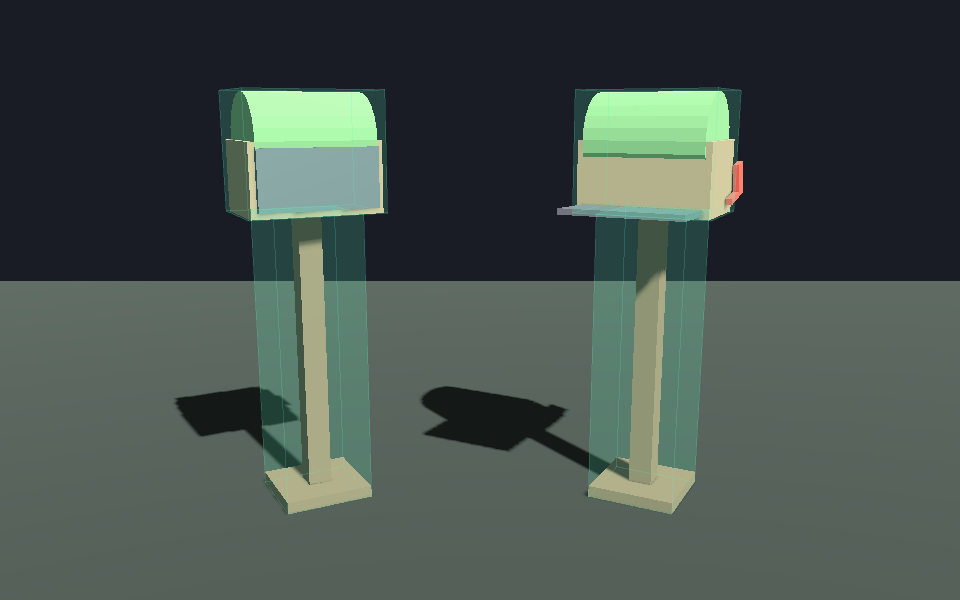
- tools/shot.gd: a render of the model as imported and at the end of a clip, colliders tinted
- Moss mailbox example (164 triangles, open clip, convex collider proxies) and a broken copy with the usual mistakes
- 24 checks in test/run_tests.py, run against Godot 4.7.2 and Blender 5.2.3
Good fit
- Checking a model from Blender, an AI 3D generator or an asset store before it goes into a Godot level
- Models that arrive 100 times too big, floating, sinking, without collisions or without their animation
- Giving an agent a clear definition of done for 3D assets
Not for
- Judging how good a model looks: look at the render as well
- Making, decimating or rigging the model: use the Blender and art skills
- Unity or Unreal imports: the checks are Godot's
Try this prompt
I exported a mailbox prop from Blender as GLB. Check it is ready for my Godot game: about 1.4 m tall, under 3,000 triangles, with colliders and an open animation.About this skill
A GameSkill original. A model is not done when its render looks good; it is done when the game can use it. tools/accept.py builds a throwaway Godot 4 project, imports the GLB the way a game would, and checks it: import errors, triangle budget, size in metres with Y up, origin at the base, materials, colliders from the file, the clips the code plays, a 120-frame drop test on a floor and runtime errors. Every failure comes with a fix. Exit codes (0 accepted, 1 failed, 2 could not run) and --json make it a gate an agent can run after each export.
Agent steps
- Ask what the game expects: size in metres, triangle budget, clip names, static or physics object.
- Export from Blender as glTF 2.0 Binary with scale applied, the origin at the base, collider proxies named
-convcolonlyor-colonly, and clips named as the code calls them. - Run
accept.py, read each FAIL and its fix, change the source file, and run it again until it printsACCEPTED. - Report the size, triangle count and clips from the report, and look at the
--shotrender.
Common errors it catches
- A model 100 times too big because it was made in centimetres, or one that floats or sinks because its origin is in the middle.
- No colliders, or a clip still called
Action.001orNlaTrackwhen the code playsopen. - An AI-generated mesh far over budget, a texture that was not packed into the GLB, and props that tip over on a floor.
Credits
The idea that a 3D asset is only done when Godot can play it comes from posts by @bykushnir and @Marlenuii (links only; no code or text was used). The code, the moss mailbox example and the text are ours.
Requirements
- Godot 4.2+ (tested on 4.7.2), run headless; set GODOT if it is not on PATH
- Python 3 standard library; no add-ons or packages
- Blender 4.2+ only to rebuild the example (tested on 5.2.3)
Topics
FAQ
Based on Blender -> GLB -> Godot acceptance (post, idea only) by @bykushnir (no licence, idea only, no code or text used). Ideas only: GameSkill wrote the code and text; CREDITS.md in the ZIP lists every source. · Based on Your AI 3D demo isn't done until Godot can play it (post, idea only) by @Marlenuii (no licence, idea only, no code or text used). Ideas only: GameSkill wrote the code and text; CREDITS.md in the ZIP lists every source.
Works well with
Skills the author points to as related or as the better fit for neighbouring tasks.
Construct
Describe a prop as data (parts in metres, joints, assembly order) and a deterministic engine builds it: an animated hologram page, and a glTF model with named parts, working joints and optional colliders for Godot, Unity, Unreal or Blender. Python standard library only.
Blender Export Pipelines
Export from Blender 5.2 with verified presets - Roblox (FBX/glTF, cages, R15, SurfaceAppearance), Unity (FBX, Humanoid), Unreal (FBX skeletal, Nanite, UCX), Godot/web (GLB, meshopt/Draco, WebP), USD.
Godot 3D Essentials
Set up 3D scenes in Godot 4.7: transforms, cameras, lights, WorldEnvironment, materials and GridMap levels.
Similar skills
ForgeSkills
28 gated game-development agent skills (concept, orchestration, verification, Blender headless, reference reconstruction, textures, animation, VFX, lighting, foliage, Godot pipeline) plus Python tools that measure the result. GameSkill hosts the 27 we ran, with the tools. Apache-2.0.
Style Cards (one art style as hard limits, switch looks by switching cards)
A GameSkill original that writes a game's art style down as a card of measurable limits (canvas, colours and palette, alpha, triangles, shading, materials, textures, voxel grid), pastes it into every asset request and checks every asset against it. Ships 12 cards from pixel and one-bit to low-poly, voxel and toon, a no-dependency PNG checker, a Blender GLB checker and a palette locker; switch the whole look by switching the card.
3AGameFactory (GameFactory-3A)
An Apache-2.0 framework of agent skills and pipelines that turns a game requirement into assets (image, 3D, motion, audio, CG video) and engine-ready code for UE5, Blender, Unity, Godot 4 and three.js.
Image to 3D Hero (one picture to a playable rigged GLB, free open-source route, three.js WASD)
A GameSkill original that takes one character image to a third-person hero you can walk with WASD, using free tools only: TripoSR or TRELLIS.2 for the mesh, UniRig or Blender for the rig, Quaternius CC0 clips, then a headless Blender fix step and a GLB check for scale, feet, facing and clip names. Meshy, Tripo and Mixamo are listed as alternatives only. Tested on Bram, a made-up stand-in hero.